iPad toons, Vegas gig

Standard

I’ve been back from Vegas for a couple of days now, and am still trying to catch up on deadlines here. Plus, good buddy Tom Richmond and his family are visiting this week now, so it may take me awhile to post many of my pix from this gig.

All in all, the gig went well, and i learned a ton of new things. For the first pic to share, I’ll show you another pic I did the night before the gig started. My wife and I hung out by the Venetian/Palazzo’s big Poker room awhile, just watching the tables. It turned out to be a good drawing area, since the players are all in one spot for awhile. Here’s one particularly unpleasant looking chap, waiting for his turn to play.
Drawn in about three minutes, btw.

… Posted using BlogPress from my iPad

ipad Toons…part 5

Standard

Another Mall sketch. See, I can draw guys still! LOL. This one was in Sketchbook Mobile, by the way, whereas some of them I’ve shown have been done in ArtStudio. I am schizophrenic with these apps…. I just can’t decide which I like best.

Server at the Venetian

Standard

More iPad drawing, getting ready for the big show tomorrow. Drawn with the Griffin stylus in ArtStudio.


– Posted using BlogPress from my iPad

iPad Stylus Reviews (Pt.4) : the OTHER iFaraday Stylus

Standard

Just in time for my big Vegas gig this week, Rustle Laidman, the inventor of the iFaraday iPad stylus, sent me his newest invention. It seems from his website that he now has three stylus types. I only have two, and I am not sure which one this is. But i can tell you that this version of his stylus has a firmer tip, and is my FAVORITE stylus now. It glides across the screen better than the Griffin, and seems more “pen or marker like” than the first iFaraday stylus. It’s incredibly accurate in it’s responsiveness, so much so that I almost forget I am drawing on an iPad. This model also has a cool black metal barrel that is less slick than the other model ( but still slicker than the Griffin ). I also kind of like the ring on the top of the pen, that is attached to a very strong little magnet. I have my pen attached to a lanyard string from an old convention I drew at, so it’s great. The only things that would make this pen even better? I’d still like to see the barrel a bit longer, less slick, and a bit bigger around ( like a “real” pen ). Oh, and even though the magnet is cool, couldn’t it also have a strong pen clip like the Griffin? If we had that, this would be as close to perfect as I’ve seen in iPad styluses. But it’s already so good, I am just nitpicking.

I’ll try to post some pix from the Vegas show this week as I draw more with this stylus. I am looking forward to it. Thanks for getting it here to me just in time, Rustle! I love it! You will too, gang, if you give it a try. ( www.ifaraday.com )

Long night…

Standard

How to know it’s going to be a long night…..
Yep, our flight to Vegas is so late, Delta is now paying for my gluten free loaded baked potato from Outback Steakhouse.

– Posted using BlogPress from my iPhone

Location:Orlando,United States

iPad Stand

Standard

Yeah, yeah, I know, the iPad has kind of taken over this blog lately. I am still drawing on paper occasionally, and on the Wacom a lot.. I’ll get back around to showing that kind of stuff soon. Promise. But for now, it’s more iPad stuff:

I picked up this cool iPad stand from Best Buy while I was there this week. It’s from Rocketfish, and securely holds the iPad in place, while allowing 360 degree swiveling. I like to hold my iPad while I draw, but if I get tired and WANT to place it up, kind of like a tabletop easel, this is going to be great for that.

VGA output from the iPad

Standard

Ah Ha! Finally got the VGA output attachment for the iPad to work. Well, to be honest, “Derek” at Best Buy did. I’m drawing for a great client next week out in Vegas, and now they’ve decided they want me to be able to have my iPad images show on the monitor in our booth. I’m cool with that – it’ll be fun to see them that large, and will “draw” people over to the booth. Just one tiny thing… that “tech-y” stuff? That’s on the other side of the brain for me. I knew the iPad would do what they wanted with the VGA attachment, and I knew the programs I draw in, ArtStudio and Sketchbook, had the ability to project on a screen, but exactly HOW do to get them to do it, I had no idea.

So, I made the first trip to Best Buy. On this trip I bought the VGA attachment and a VGA cord. You need both. The total for them was about $75 ( I got the 8 ft long VGA cord). I brought my new purchases home, and the first thing I did was to call my buddy Scott Sullivan, who with his lovely talented wife, Angie Jordan, are really pioneering the iPad caricatures. (Check out their website , www. digitalblacksmiths.com , and their videos on YouTube for lots of great info and art.) Scott told me what to do, how easy it all was. So, I plugged the VGA attachment to my ipad, the VGA cord to it, and then the other end of the cord I hooked up to my laptop, and… nothing. I called Scott AGAIN ( thanks for your patience with me, buddy! ). Oh… it seems that neither of the laptops I have actually have VGA OUT. Neither does my shiny big iMac 27″. Neither do ANY televisions in my house. I knew in THEORY this was all supposed to work, but I didn’t want my client to be disappointed when I am there in Vegas if I can’t make it work.
So, I did the only logical thing. I went back to Best Buy. To Derek again, who’d sold me the stuff the day before. I told him my issue, and said ( nicely ), that if he couldn’t make this work, I was going to return the merchandise for a refund. He wasn’t at all flustered, being the tech-y, left brained kind of guy he is.
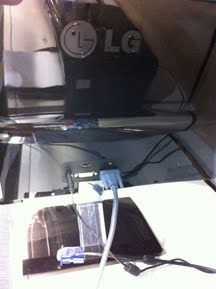
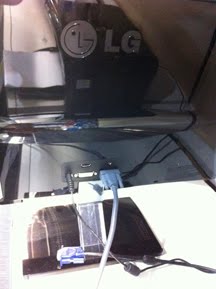
He took the VGA cord and plugged it into the back of a monitor they had on display in the store…
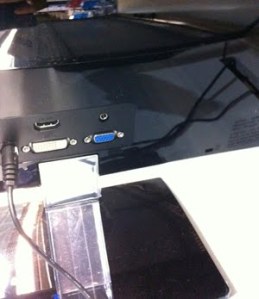
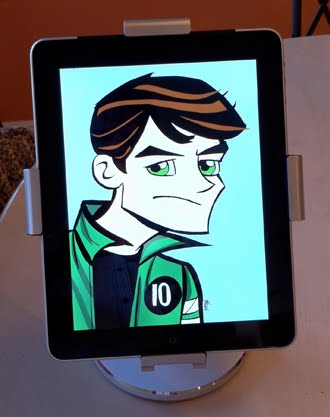
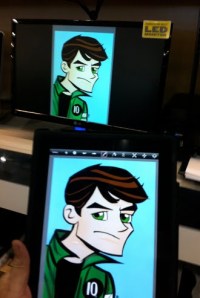
…right into what, for me, had been a very elusive VGA output port. For the right brained artsy types of you out there like I am, it seems most VGA ports are now color coded BLUE. As you can see from the first photo of this post, once we had it hooked up, my iPad did exactly what it was supposed to do. Success!
I hope this helps anyone else out there looking to do the same thing….
iPad Toons…part 4

Standard

I went to the Food Court in a local mall today, to just sit there and draw random people on the iPad. Was great practice, trying to capture them before they got up and left. Also, drawing “incognito” was an interesting challenge. But I never got caught!

Yeah, yeah, I could’ve taken more time on the chairs and stuff. I was more interested in drawing fast, and playing with the iPad rather than spending too long on making any one drawing “perfect”.
More tomorrow….

Weighting…

Standard


Back at the Y for physical therapy. Thought I’d bang out a quickie of this guy trying to psyching himself up to lift.

Posted using BlogPress from my iPad